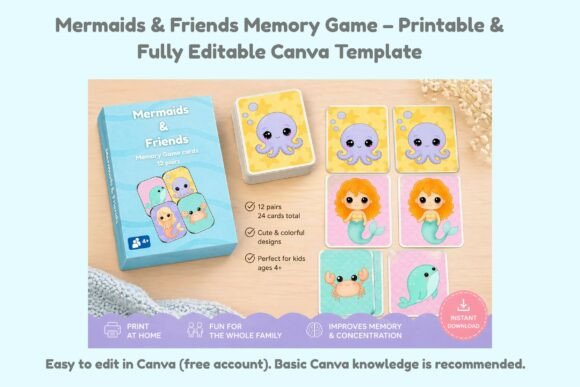
Mermaid Memory Game for Canva: Design & Print
Creating a fun and functional memory game has never been easier, thanks to the Mermaid Memory Game Canva template. Whether you're a parent looking for a creative activity for your kids, a teacher planning an engaging classroom game, or a small business owner wanting to design and sell physical products, this cute, mermaid-themed template offers a simple and flexible solution.
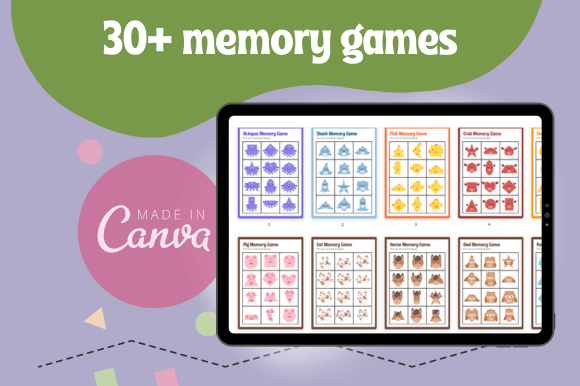
This memory game template comes with 24 cards (12 matching pairs), all designed with a playful underwater theme that appeals to children and adults alike. What makes it even more appealing is that it's fully editable within Canva—even with a free account. You don’t need any prior design experience to personalize the cards, colors, or text to match your specific needs or branding.
Why Use a Mermaid-Themed Memory Game?
The Mermaid Memory Game Canva template combines visual charm with practical usability. The underwater theme adds a layer of fun and imagination, making it especially attractive for children. But its appeal goes beyond just looks. The game helps improve memory skills, concentration, and pattern recognition—making it ideal for both entertainment and learning.
For educators and parents, memory games are a great way to support cognitive development in a playful setting. For small business owners and creators, it's a chance to offer a ready-to-print product that customers can enjoy right away. And because it's digital and customizable, you can tailor the design for different events, themes, or target audiences without starting from scratch each time.
Where Can You Use This Template?
The versatility of the Mermaid Memory Game Canva template makes it suitable for a variety of settings and purposes. Here are a few examples:
- Kids' parties: Add a themed activity to your next mermaid or ocean-themed birthday celebration. Print and laminate the cards for durability and reuse at future events.
- Classroom learning: Teachers can use the game to reinforce vocabulary, shapes, or colors. Simply edit the text or images to align with your current lesson plan.
- Small business products: If you run a print-on-demand shop or Etsy store, this game can be a charming addition to your product lineup. Just customize, print, and package it as a physical item.
- Family game nights: Create a personalized version for your own home use—swap out the default images or text to make it relevant to your family’s interests.
How to Customize and Use the Template
Once you've downloaded the Mermaid Memory Game Canva template, you'll receive a link to open it directly in Canva. From there, you can:
- Edit the text, colors, and fonts to suit your preferences.
- Swap out images or illustrations to create a unique version of the game.
- Adjust the language if you're using it in a non-English-speaking environment.
- Download the final design in high-resolution format for printing.
Because the template is print-ready, you can send it straight to your home printer or a local print shop. For extra durability—especially if you're selling or reusing the game—consider printing on cardstock or laminating the pages.
What to Know Before You Start
Before diving into your design, keep a few important points in mind. First, the template is designed for use with Canva's free version, so you don't need a Pro account to make changes. Second, while you're free to customize and print as needed, the digital files themselves cannot be resold or shared. You can, however, sell up to 500 printed copies under the small commercial use license.
If you're planning to sell the game as a physical product, it's a good idea to test the design with a small print run first. Make sure the cards are clear, durable, and easy to handle. You may also want to package them in a small pouch or box to make the product more appealing and professional.
Design Tips for Best Results
To get the most out of your Mermaid Memory Game Canva template, consider these beginner-friendly tips:
- Stick to a consistent style: Keep fonts and colors cohesive to maintain a polished look across all cards.
- Use high-quality images: If you're replacing the default graphics, choose clear, high-resolution images to ensure they look sharp when printed.
- Test before printing: Preview your design on screen to catch any layout or alignment issues before printing.
- Add your branding: If you're using this for business, include your logo or website on the back of the cards or in the packaging.
Final Thoughts
The Mermaid Memory Game Canva template is a smart, user-friendly way to bring a little creativity and fun into your personal or professional projects. Whether you're crafting for your kids, preparing a classroom activity, or building a small product line, this template offers a simple and effective way to get started. With just a few clicks, you can design, customize, and print a game that’s as practical as it is adorable.
So why not dive in and see what you can create? With the right tools and a little imagination, you’ll be amazed at how quickly you can turn a simple template into something special.