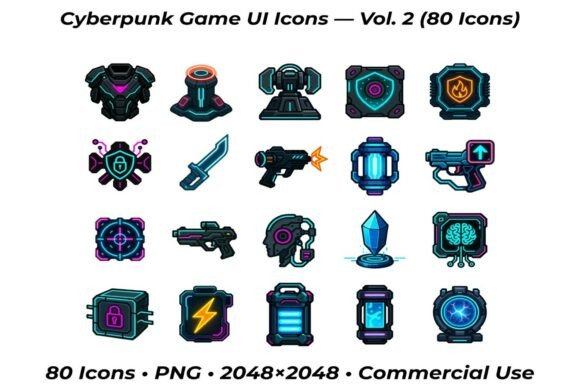
Cyberpunk Game UI Icons — Vol. 2: A Practical Toolkit for Modern Designers and Developers
Bringing Neon Tech to Life in Your Game UI
When it comes to game design, especially in the cyberpunk genre, visuals matter more than ever. Cyberpunk Game UI Icons — Vol. 2 steps in as a powerful asset for developers and UI/UX designers aiming to inject that futuristic, neon-soaked aesthetic into their projects. This pack includes 80 high-resolution icons, each designed with precision to reflect the essence of a high-tech, dystopian world. From glowing energy cells to pulsating AI servers, these icons are crafted to blend seamlessly into modern game interfaces.
What makes this pack stand out is its focus on usability and visual consistency. Whether you're designing a character's inventory system or a mission control dashboard, these icons provide a unified look that enhances user experience without overwhelming the interface. They're especially useful for developers working on fast-paced RPGs, strategy games, or immersive simulations where clarity and style must coexist.
Real-World Use Cases for Cyberpunk UI Icons
Let’s say you’re building a cyberpunk-themed RPG where players manage energy resources, hack into AI systems, and upgrade weapons mid-combat. The icons in Cyberpunk Game UI Icons — Vol. 2 serve as intuitive visual cues — a glowing battery for energy levels, a pulsing data link for hacking, or a flickering shield for defense status. These aren’t just decorative elements; they help players understand what’s happening in the game without needing lengthy explanations.
Another scenario could involve a mobile game developer creating a minimalist but futuristic UI for a puzzle-based strategy title. The neon glow and high contrast of these icons make them perfect for small screens, ensuring that players can quickly identify actions and navigate menus even in low-light environments. The 2048 × 2048 pixel resolution also means they scale beautifully across devices, from smartphones to high-end gaming monitors.
Designers working on UI/UX for AR or VR experiences set in a cyberpunk world can also benefit from this pack. In immersive environments, every visual element contributes to the sense of place. These icons can be used in holographic interfaces, mission logs, or interactive panels, reinforcing the futuristic tone without breaking immersion.
Who Benefits Most from This Icon Pack?
Indie game developers often wear multiple hats — designer, artist, and programmer — and time is a luxury they rarely have. Cyberpunk Game UI Icons — Vol. 2 offers a ready-made solution that fits into a variety of design pipelines. Instead of spending hours sketching and refining icons from scratch, developers can drop these into their projects and focus on gameplay mechanics or story development.
UI/UX designers working on client projects with tight deadlines also find value in this pack. Suppose a client wants a game interface that feels “tech-forward” but doesn’t have a defined visual direction. In that case, using these neon-style icons can quickly establish a strong visual identity that aligns with the cyberpunk theme. Plus, the PNG format with transparent backgrounds makes integration into different UI frameworks straightforward, whether you're using Unity, Unreal Engine, or Figma.
Even digital artists and concept designers can use these icons as reference material or inspiration for their own work. The design language — sharp edges, glowing lines, and tech-inspired shapes — can influence character gear, interface layouts, or environmental design in larger concept art projects.
Choosing the Right Icons for Your Project
Before diving into this pack, it’s worth considering how well the icon styles align with your game’s overall aesthetic. The neon glow and high-contrast visuals work best in darker, high-tech environments. If your game leans more toward a steampunk or low-tech vibe, these icons might clash with the intended tone.
Also, while the pack offers a wide range of icons — from weapons like laser pistols and grenades to energy and data systems — it’s not infinite. If your game requires a highly specialized set of icons (like alien tech or arcane magic systems), you may need to supplement this pack with custom illustrations or additional assets.
Another consideration is scalability. These icons are large — 2048 × 2048 pixels — which gives them flexibility, but they may need to be resized or stylized further to fit into certain UI frameworks. Designers using Unity or Unreal might want to optimize them for performance, especially if they’re using dozens of icons simultaneously in a dynamic HUD.
Maximizing Impact with Strategic Implementation
One of the smartest ways to use these icons is to pair them with minimalist UI layouts. Too many visual elements can overwhelm players, especially in fast-paced or action-heavy scenes. By using a clean background and letting the neon glow of the icons stand out, you create a UI that’s both functional and visually engaging.
For example, a mission control screen might feature a central AI server icon surrounded by smaller indicators for data links, power reserves, and security alerts. Each icon acts as a clickable element, allowing players to drill down into specific systems without cluttering the screen.
Another effective use is in dynamic HUDs where status changes are visually communicated through color shifts or pulsing effects. A battery icon could change from green to red as energy depletes, or a shield icon might flicker when under attack. These subtle cues enhance gameplay without requiring constant text prompts.
Final Thoughts for Designers and Developers
Cyberpunk Game UI Icons — Vol. 2 isn’t just a design asset — it’s a tool that bridges the gap between form and function. Whether you’re building a full-fledged RPG, a sleek mobile app, or an immersive VR experience, these icons help create a visual language that players can understand at a glance. They offer flexibility, scalability, and a strong thematic identity that fits perfectly in today’s game design landscape.
If you’re looking to speed up your design process while maintaining a high level of polish, this pack is worth considering. It’s especially valuable for developers and designers who want to focus more on gameplay and storytelling, knowing their UI is already visually striking and functionally sound.