Game Console Embroidery: A Gamer’s Guide to Personalizing Your Style
For gamers who want to showcase their passion beyond the screen, personalizing fabrics with game console embroidery is a stylish and creative way to stand out. Whether it’s a hoodie, t-shirt, or even a custom hat, adding a machine embroidery design featuring a game console can elevate your look and express your personality. But while the idea of custom embroidery sounds exciting, many people overlook important details that can affect the final result—especially when it comes to file formats, machine compatibility, and fabric selection.
Understanding Game Console Embroidery Designs
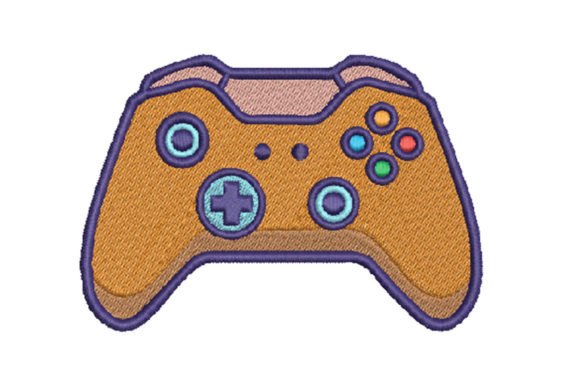
Game console embroidery designs are digital patterns used by embroidery machines to stitch out images of gaming consoles, logos, or related graphics onto fabric. These designs are especially popular among gamers who want to personalize their clothing or accessories with a unique, machine-made touch. Most designs come in multiple file formats such as PES, DST, EXP, and more, which ensures compatibility with a wide range of embroidery machines.
However, just because a design is labeled as compatible with multiple machines doesn’t always mean it will work perfectly on yours. It's crucial to verify the specific format your machine uses before purchasing or downloading a design.
Common Mistakes When Choosing and Using Embroidery Files
Many people jump into embroidery without realizing the small but significant details that can affect the outcome. Here are some common mistakes and how to avoid them:
1. Skipping Format Verification
One of the most frequent errors is assuming that all embroidery file formats are interchangeable. While some machines can read a variety of formats, others are limited to specific ones like PES for Brother machines or DST for Tajima industrial machines. Always check your machine’s manual or manufacturer recommendations before purchasing a design.
Better approach: Keep a list of compatible formats for your machine and only download designs in those types. If needed, use a reputable conversion tool or service to change formats—but be cautious, as this can sometimes distort the design.
2. Ignoring Fabric Type and Thread Quality
Another oversight is not considering the type of fabric you're embroidering on. Lightweight fabrics like cotton may pucker if not stabilized properly, while thicker materials like fleece may require larger needles and stronger threads. Similarly, using low-quality thread can lead to fraying or a dull finish, which can detract from the design's visual appeal.
Better approach: Choose appropriate stabilizers and high-quality embroidery thread suited for the fabric type. For example, use a tear-away stabilizer for sturdy fabrics and a wash-away stabilizer for delicate materials.
3. Underestimating Design Size and Placement
Many beginners assume that a design will scale easily to fit any space. However, resizing an embroidery design too much can cause distortion or stitching errors. Also, placing a large design on a small item like a cap can lead to an unbalanced look or mechanical issues during stitching.
Better approach: Always check the hoop size requirements of your machine and ensure the design fits within those dimensions. Use a design editing software to preview placement and scale before stitching.
What to Check Before Downloading or Buying a Design
Before committing to a design, there are several factors to evaluate to ensure you get the best results:
- File formats included: Make sure the package includes the correct format for your machine.
- Stitch count: Higher stitch counts mean more detail but also longer embroidery time and more thread usage.
- Hoop size: Confirm that the design fits your machine’s largest hoop or that you’re willing to split the design into sections if necessary.
- Customer reviews: Look for feedback about ease of use, clarity of the design, and compatibility with specific machines.
How to Avoid Costly Embroidery Mistakes
Embroidery can be a rewarding hobby or business, but costly errors can be avoided with a bit of planning and knowledge. Here are some practical tips to help you get the most out of your game console embroidery projects:
- Test on scrap fabric first: Always run a test stitch on a similar fabric before applying the design to your final item.
- Use the right needle: Different fabrics require different needle types—using a sharp needle on knit fabric can cause runs.
- Keep your machine clean: Dust and thread lint can interfere with stitching, so regular maintenance is essential.
- Back up your files: Store your embroidery files in a safe, organized folder to avoid losing them or accidentally overwriting them.
Why Game Console Embroidery Makes a Great Gift or Personal Statement
Whether you're customizing a gift for a fellow gamer or adding a personal flair to your own wardrobe, game console embroidery offers a fun and expressive way to connect with your passion. It's also a great way to start a small side business or create unique merchandise for events, clubs, or online stores.
Just remember, the key to successful embroidery lies in preparation, attention to detail, and understanding your machine’s capabilities. By avoiding common pitfalls and choosing the right tools and materials, you can create high-quality, eye-catching designs that truly stand out.
Final Thoughts: Make Your Mark with Confidence
Embroidery is more than just a craft—it's a way to personalize your world and express your individuality. With the right approach, game console embroidery can be a satisfying and creative outlet. Take the time to learn your machine’s features, double-check file compatibility, and choose the right supplies for each project. Doing so will help you avoid frustration and achieve professional-looking results every time.
If you're new to embroidery, start with smaller, simpler designs and work your way up as you become more comfortable. And don’t be afraid to experiment with colors, fabrics, and layouts to make your design truly your own. With a little patience and the right mindset, you’ll be stitching up stylish, personalized items in no time.